

3·
29 days agoDo it, 100% worth it! Also has some extra stuff for already-experienced users if it gets too easy :)
I am but a cog in a machine. A lazy one though.
If you are new on Lemmy, check out: https://lemmyverse.net/communities for communities to join and https://www.lemmyapps.com/ for an awesome list of lemmy apps!
Do it, 100% worth it! Also has some extra stuff for already-experienced users if it gets too easy :)
I had the same issue, this is indeed perfect for that level and a nice cozy start for your server admin journey :) I hope you enjoy it as much as I did!
I hope someone else can pitch in with a more indepth instructions, but two things I wanted to mention:
First, forget about hosting your own email from home. Seriously. Even those who do it professionally don’t want to deal with that at home. You’ll find people on fediverse who do it but I’m sure plenty will give you this same recommendation/warning. It’s a huge hassle and it’s so easy to get your domain blocked/ending up on a blacklist and way harder to get out of it.
Second, I can personally recommend https://linuxupskillchallenge.org/ if you are really starting from scratch ( there’s a community here: !linuxupskillchallenge@programming.dev ). This is how I started and set up my own linux server and started self hosting stuff on it. It’s really basic and won’t teach you everything you need but it’s a great start for setting up your own server. You can do everything with a local server at home that you have set up.

No problem, glad that we were able to provide you a useful answer. Highly recommend checking out the community blaze linked in a comment below to get an idea how the lang stuff works on lemmy!
Correct me if I’m wrong but you can select multiple viewing languages. It’s just slightly unintuitive in lemmy-ui: hold either CTRL or SHIFT (I forgot, apologies) while you select languages in your profile settings.
The default posting language/allowed languages are decided on community level by mods.
Edit: didn’t want to just say unintuitive without offering an alternative, so: visible checkboxes would maybe be more intuitive?
Couldn’t you just place a sticker on top? I know that you’ll either not get the led light or it’s gonna look a bit funny in the dark if part of the windows logo shines through if the sticker is not thick enough, but you can place a tiny tux sticker there!
I had a look and determined I need bit more time for this all than just today (long work day and a lot of additional info + need to get into lemmy-ui codebase a bit).
You’ve got some good points there, thank you! I’m not a UI or UX expert but it’s a bit of a challenge reducing the amount of clicks and still keeping it mobile friendly without creating a screen full of options with several scrolls needed to reach the actual search, but I agree the goal should be less-actions.
I think once I have a bit of a grasp on the project I’ll try and submit my suggestion.
Will do, thank you!
Ah good point!
I’ll hopefully manage to set up lemmy-ui locally at home after work and make that pull request - I edited that in with webdev tools since didn’t want to lose that thought before I get home (sorry if this just pollutes the discussion).
Yeah there’s a lot to consider here, good points. The language specific texts too to make it more search selection context based. This would need to be thought through to not make it more confusing.
I’m not a UI or UX expert, but I wonder if it would make the search page nicer if instead of the search target (form select) would be tabs instead of a dropdown since it is distinct selection from the other filters in the search?
using bootstrap tabs (I didn’t put any effort into styling just added bootstrap tabs and removed the form select butto dropdown):
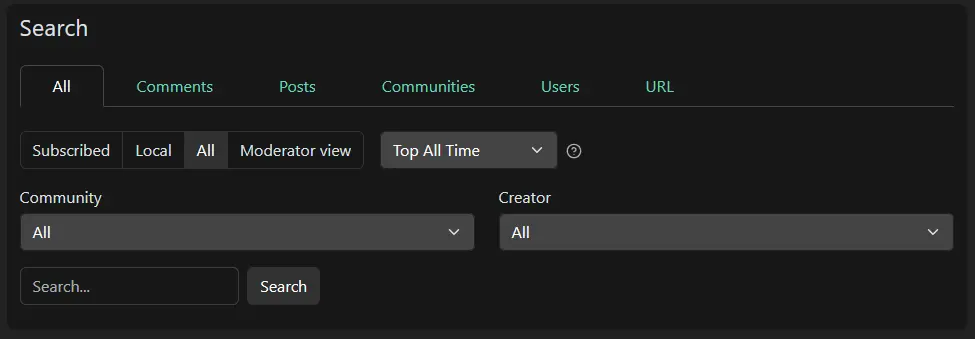
Edit: now that I think about it, the tab might be kinda confusing unless also the other dropdowns are slightly altered to give more context in the current form selection tab, e.g. (text changes):

But yeah I just wanted to throw out ideas, I’m not sure about them myself. The search inside a community is nice addition!

Oh god… You’ll have to learn IIS. Internet Inf🤮rmation Services.
In all seriousness Windows Server is much more enjoyable than Home/Pro/Enterprise or whatever the desktop versions are called. You have more control over the system and they don’t hinder you from configuring stuff unlike on the desktop version.
Someone already suggested to get a VPS and just get to know the system. A tip though if you have to spin up a windows server on Azure vs somewhere else: search for info with the keyword “azure”. Microsoft stuff seems to work worse on their own cloud than anywhere else. MS SQL Server and Azure’s version of MS SQL Server differs and lacks features.
Been a long time since I had to use any of the above so things might have changed.
SimpleX Chat – Many suggested this and I will explicitly recommend against it due to the founder’s positions on various topics. This includes being anti-vaxx, believing COVID-19 was a hoax, trans- and homophobia, climate denial; In the SimpleX Groupchat he’s also been seen basically bootlicking trump a couple times, but I’ve lost receipts to that.
I did not know this. I’ve seen people recommend SimpleX on lemmy too, but probably they didn’t know.


I’m not forced to, but occasionally my job kinda requires it so I dualboot (most of my coworkers who are on linux run a windows virtual machine when they need it).
But my previous job required windows due to all the industry specific software only working on windows. No chance of getting that to work on linux sadly. Then I just used windows at work. It’s always my employer’s hardware anyway and I like to keep work and free-time separate so it was ok.